NEO TASK: cleaning, setup, maintenance and calibration as production gates
The work between batches decides whether the next one can start. Track cleaning validity, dirty time, maintenance and calibration per resource — and let the system block anything that is not compliant instead of trusting a logbook.


Cleaning, calibration and maintenance rounds are easy to miss on paper. NEO TASK schedules recurring work, assigns it and records completion with evidence.
Supervisors see what is due, overdue and done — in real time.
The work between batches
Between one batch and the next there is a body of work that no production schedule shows: the room has to be cleaned, the equipment set up for a different product, a preventive maintenance carried out, an instrument calibrated. None of it produces anything, and all of it decides whether the next batch can legally start.
In most plants this work is tracked separately from production — a cleaning logbook here, a maintenance system there, a calibration spreadsheet somewhere else. The consequence is predictable: production is scheduled against equipment whose real state nobody can confirm without walking over and asking.
NEO TASK manages that layer alongside production flow, so the state of a resource is part of the same picture as the orders that depend on it.
One place for the work between batches
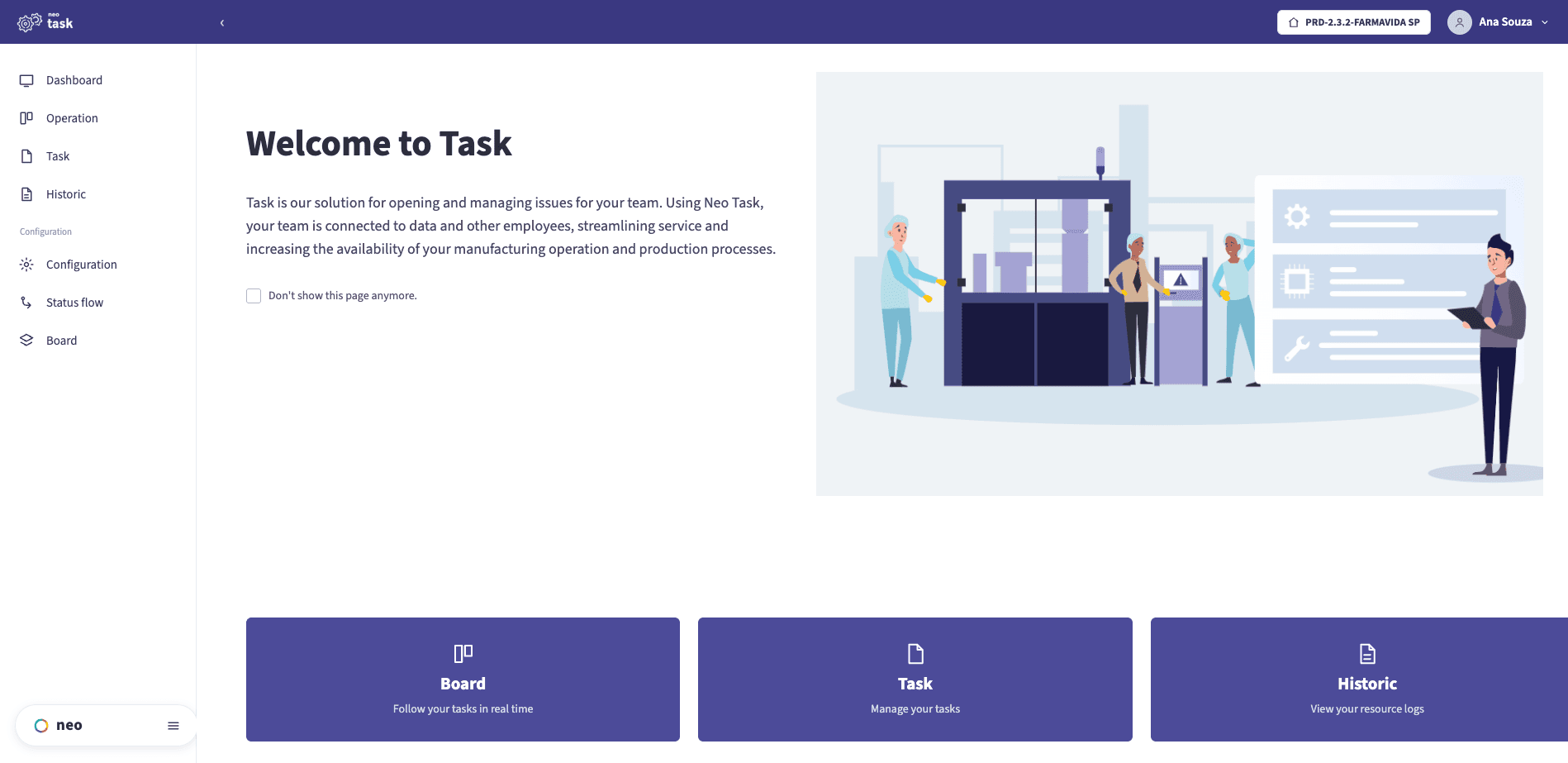
From the home screen the team reaches the operation board, the tasks and the resource history — the cleaning, setup, maintenance and calibration work in one workspace instead of a logbook per area.
What NEO TASK solves
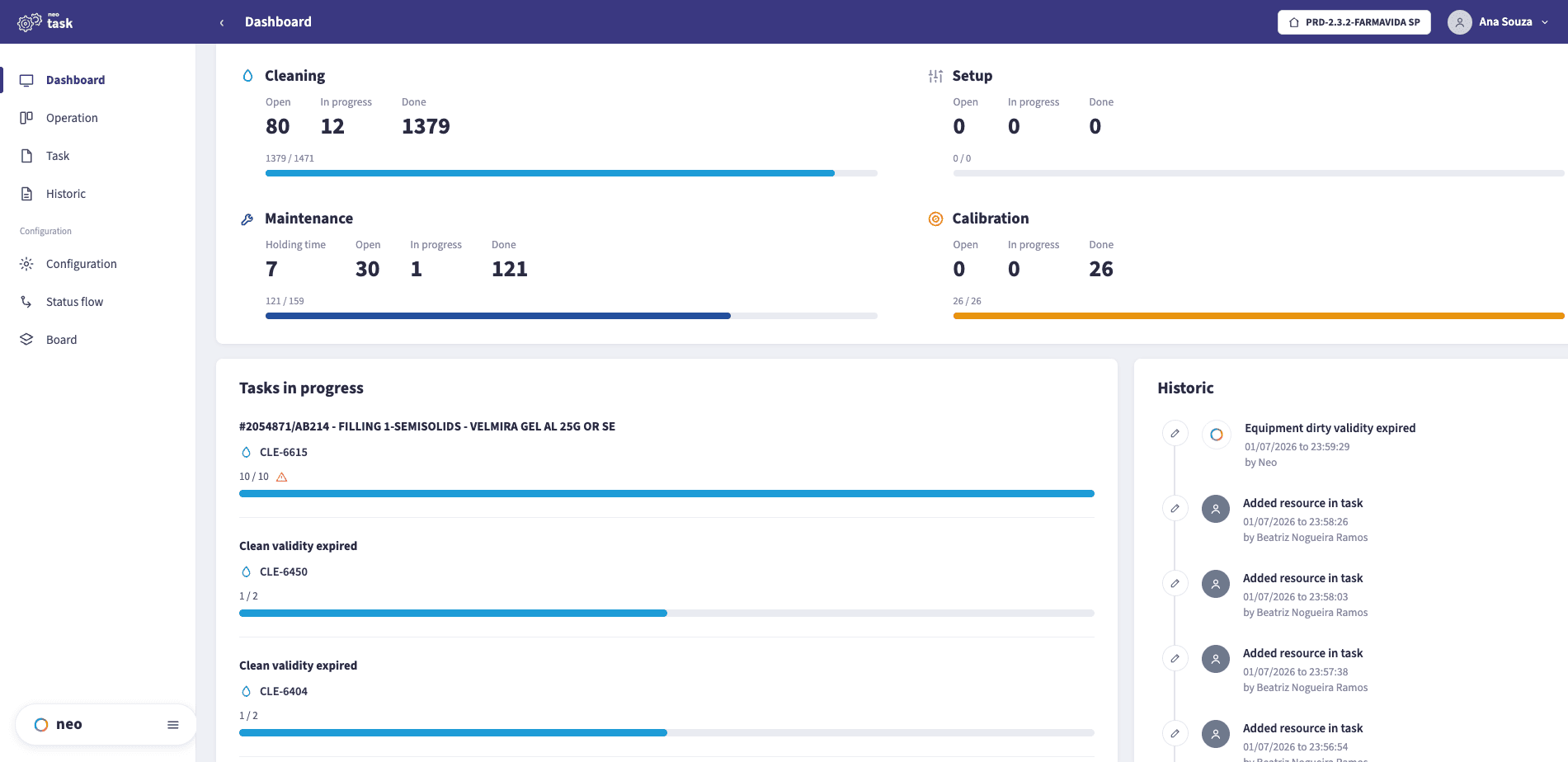
Tasks in progress, with a live history
The dashboard rolls up cleaning, setup, maintenance and calibration, shows what is running right now against its resource, and keeps an attributable history beside it — including when a resource’s clean or dirty validity expired.
See it running
A walkthrough of cleaning, setup, maintenance and calibration tasks, and how a resource is released back to production.
The block: a resource that is not compliant cannot be used
The feature that changes the most is the least glamorous one: when a resource has an outstanding compliance problem — cleaning validity expired, calibration overdue, a maintenance not closed — the system blocks it, and production cannot be started on it.
This is the difference between a rule and a control. A procedure that says equipment must be clean before use depends on everyone remembering, and on nobody being under pressure at the end of a shift. A block does not.
It is also what makes the claim defensible afterwards. The batch record can point at the state of every resource at the moment it was used, rather than at a signature asserting it was fine — the same distinction that data integrity draws between evidence and assertion.
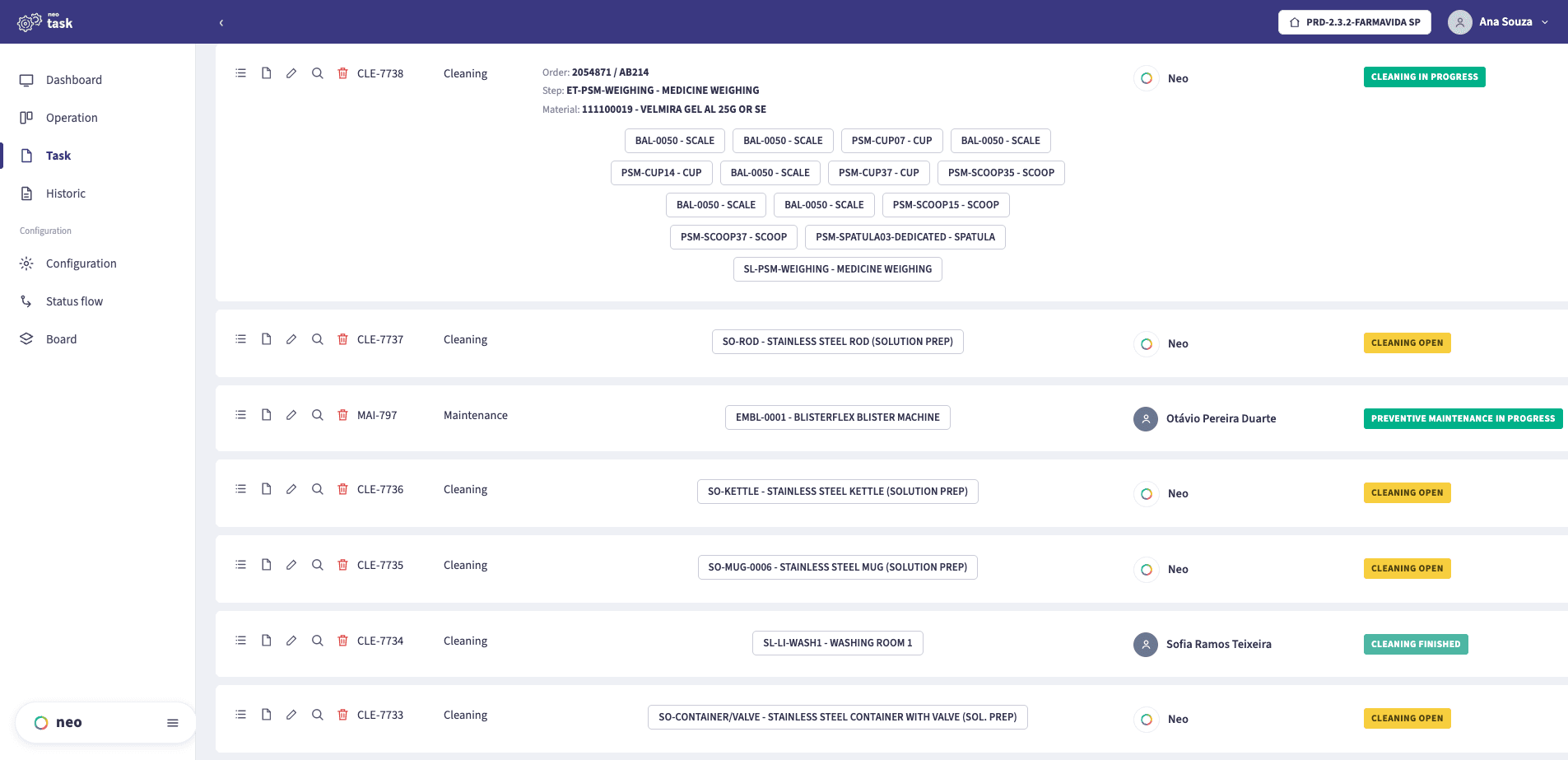
Every task, by resource and situation
Cleaning and maintenance tasks listed against the resource they act on — a scale, a scoop, a blister machine — each with its situation, so open work is a filter rather than a walk across the plant.
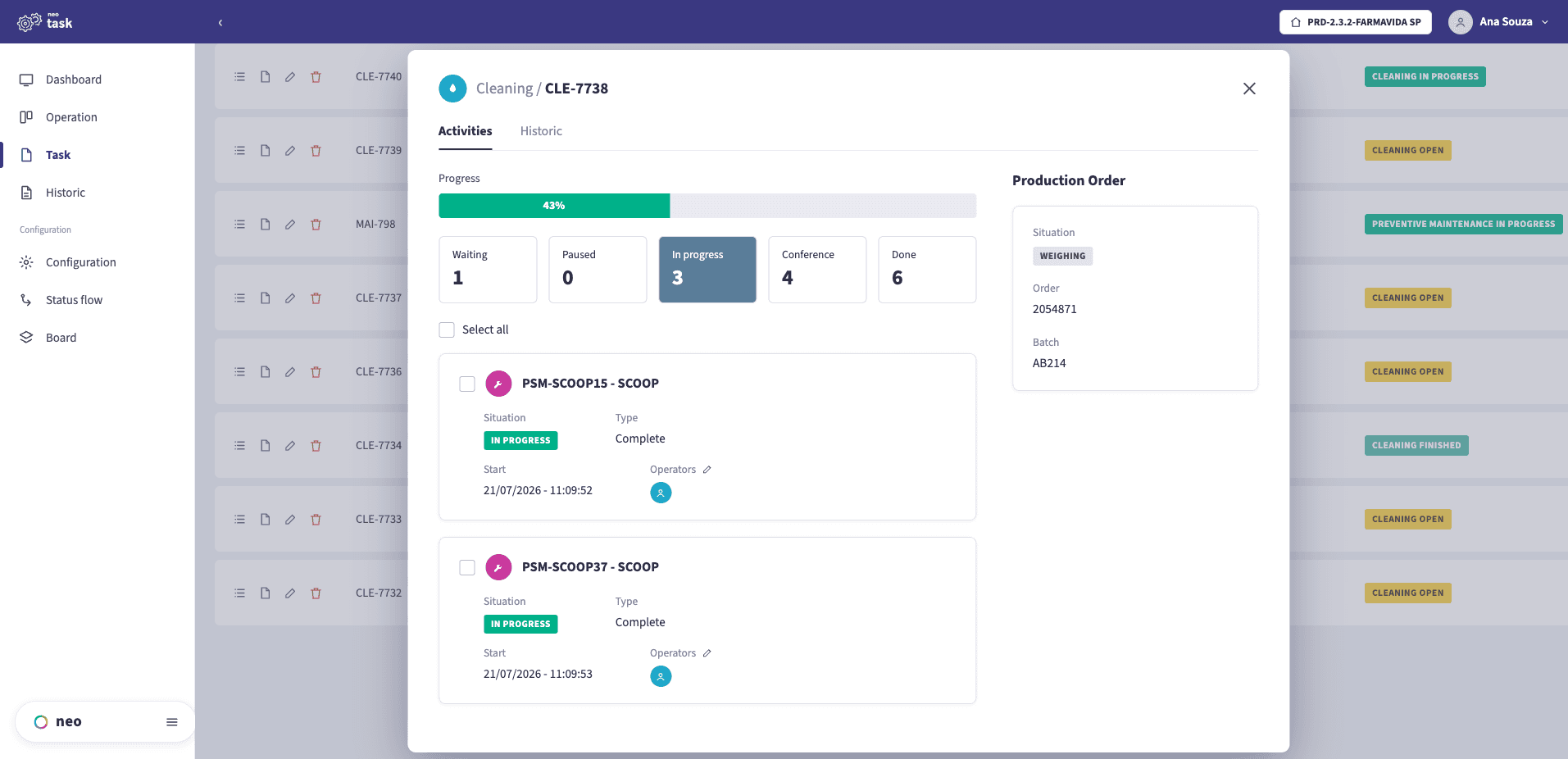
Inside a task: activities against a production order
A task breaks into per-resource activities — waiting, in progress, in conference, done — each with its operator and start time, tied to the production order and batch the work belongs to.
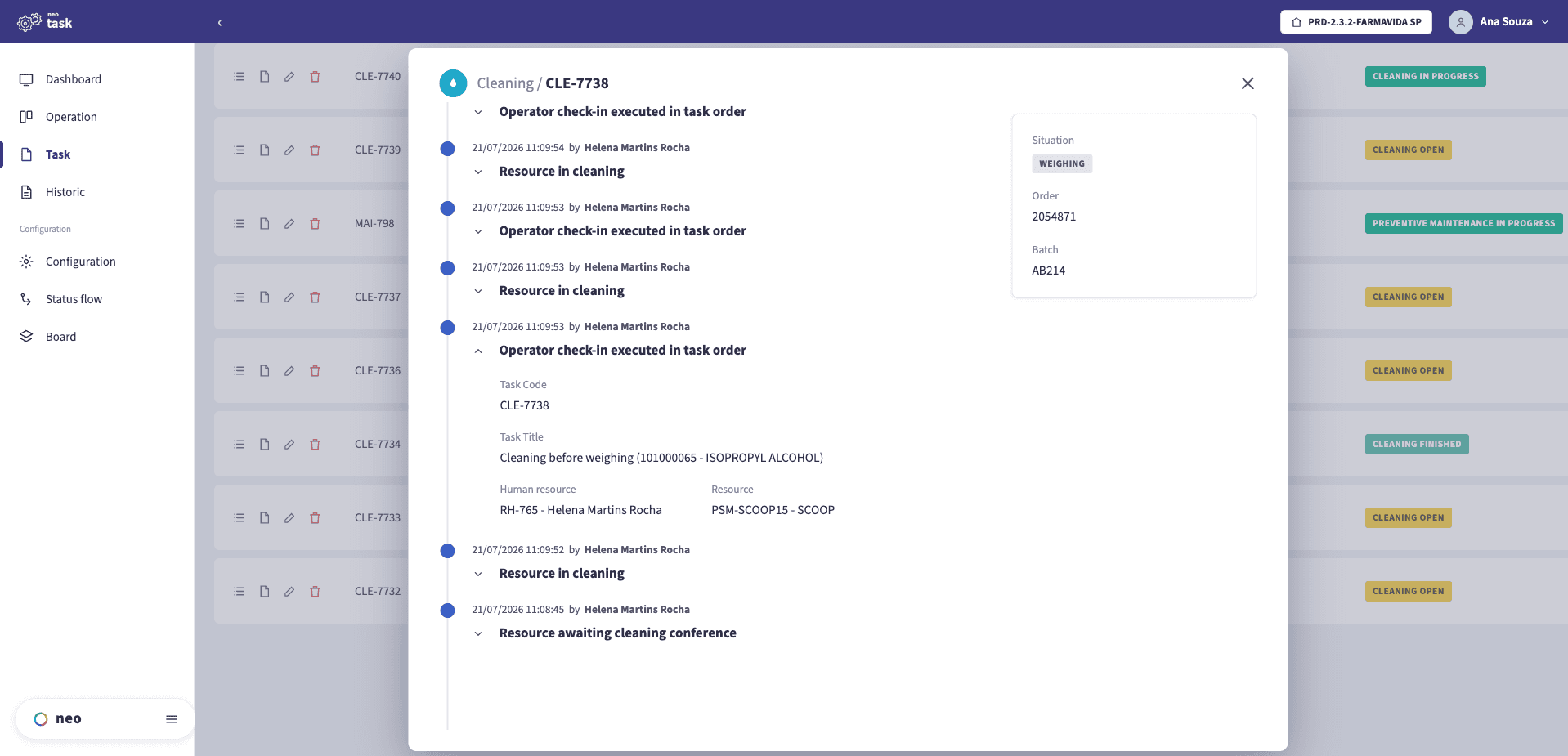
An attributable history per task
Every state change — resource in cleaning, operator check-in, awaiting conference — is written to the task with who did it and when, so the readiness of a resource is evidenced rather than asserted.
Clean, dirty, and the clock between them
Cleanliness is not a permanent property. A cleaned room or vessel stays valid for a defined period, after which it has to be cleaned again whether or not it was used — and the dirty state has its own clock, because equipment left dirty beyond a window may require a different, more thorough procedure.
Managing that by paper logbook produces three recurring failures:
- Validity discovered late — a room found expired at the moment a batch was meant to start, turning a planned change into an unplanned delay.
- Dirty time uncounted — nobody tracks how long equipment has been waiting to be cleaned, so the escalation to a heavier procedure is missed.
- Related resources forgotten — maintenance on one machine affects the utensils, rooms and instruments around it, and a logbook does not know that.
The system tracks both clocks, warns before expiry rather than after, and knows which other resources a task affects — so releasing one does not silently leave another in an invalid state.
Tasks created by production events, not by hand
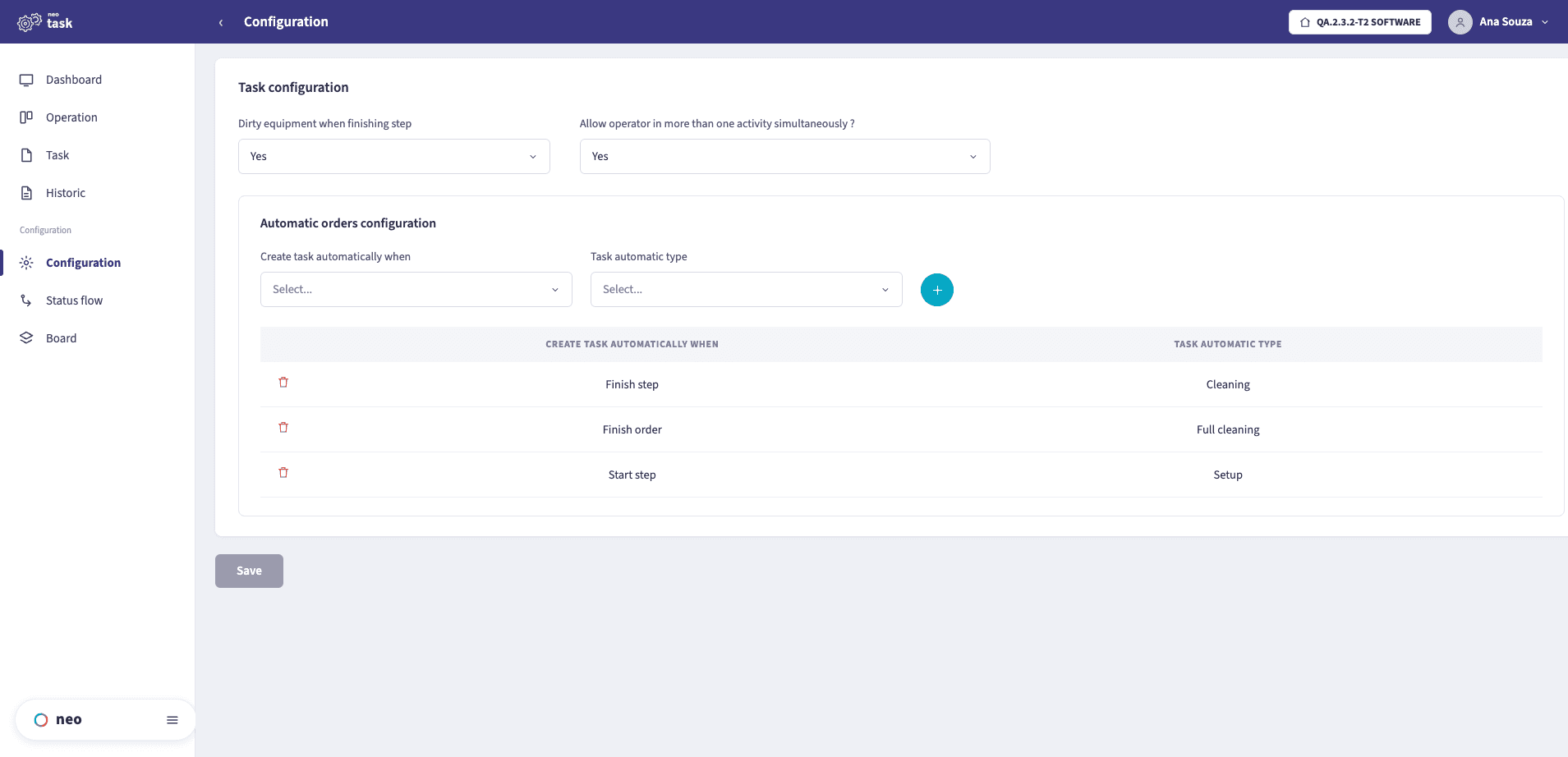
Configure the equipment to become dirty when a step finishes, and let production events open the right task automatically — a cleaning when a step ends, a full cleaning when an order finishes, a setup when a step starts.
If the answer involves a logbook on a clipboard or asking whoever cleaned it last, that is the gap. Talk to our team about mapping your cleaning, setup, maintenance and calibration rules.
What it covers
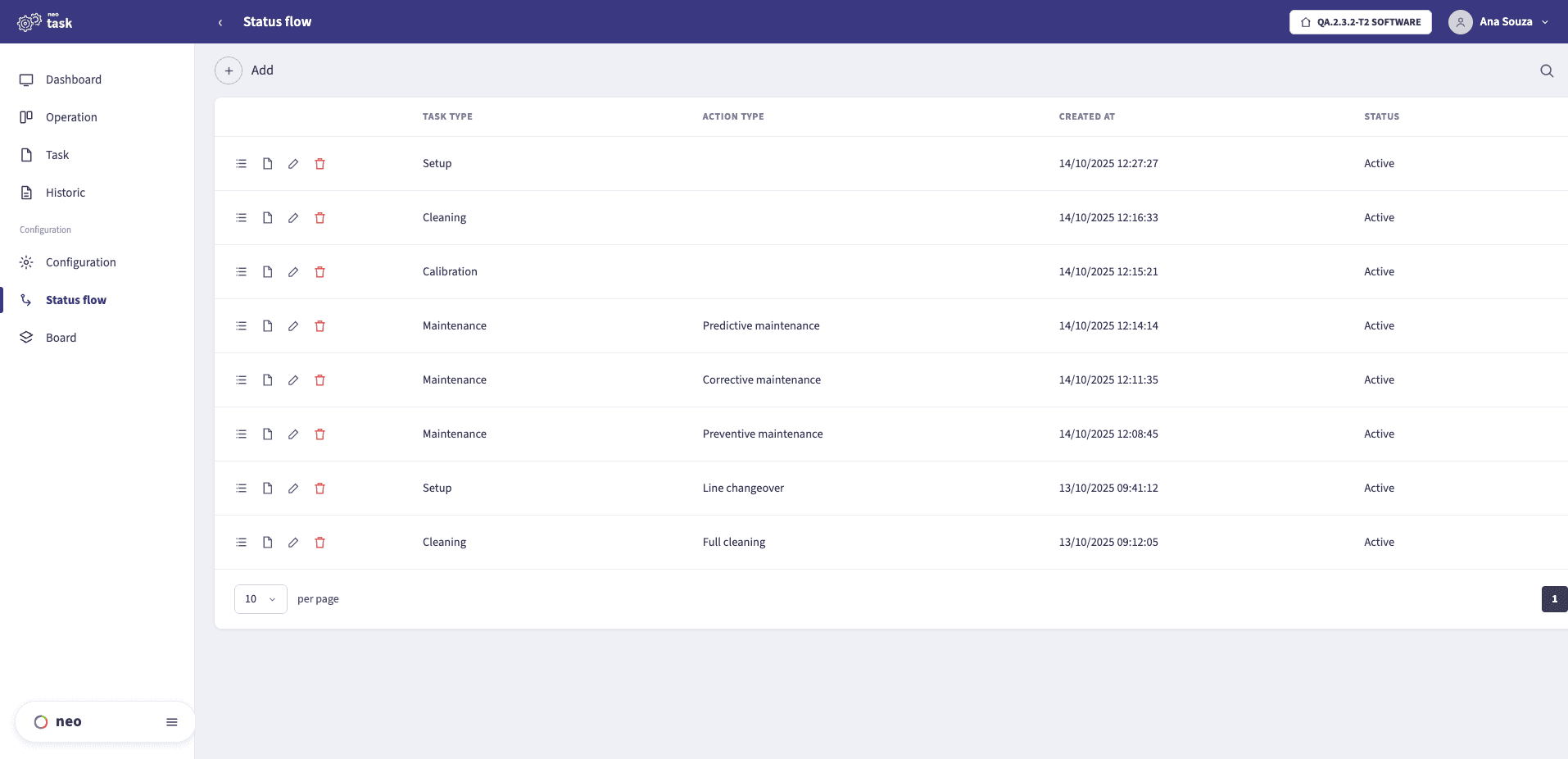
Configurable workflows per task type
Each task type — cleaning, setup, maintenance, calibration — and each action, like preventive or corrective maintenance, follows its own configured status flow, so the sequence a resource must pass through is defined once and enforced by the system.
Boards by state, in real time
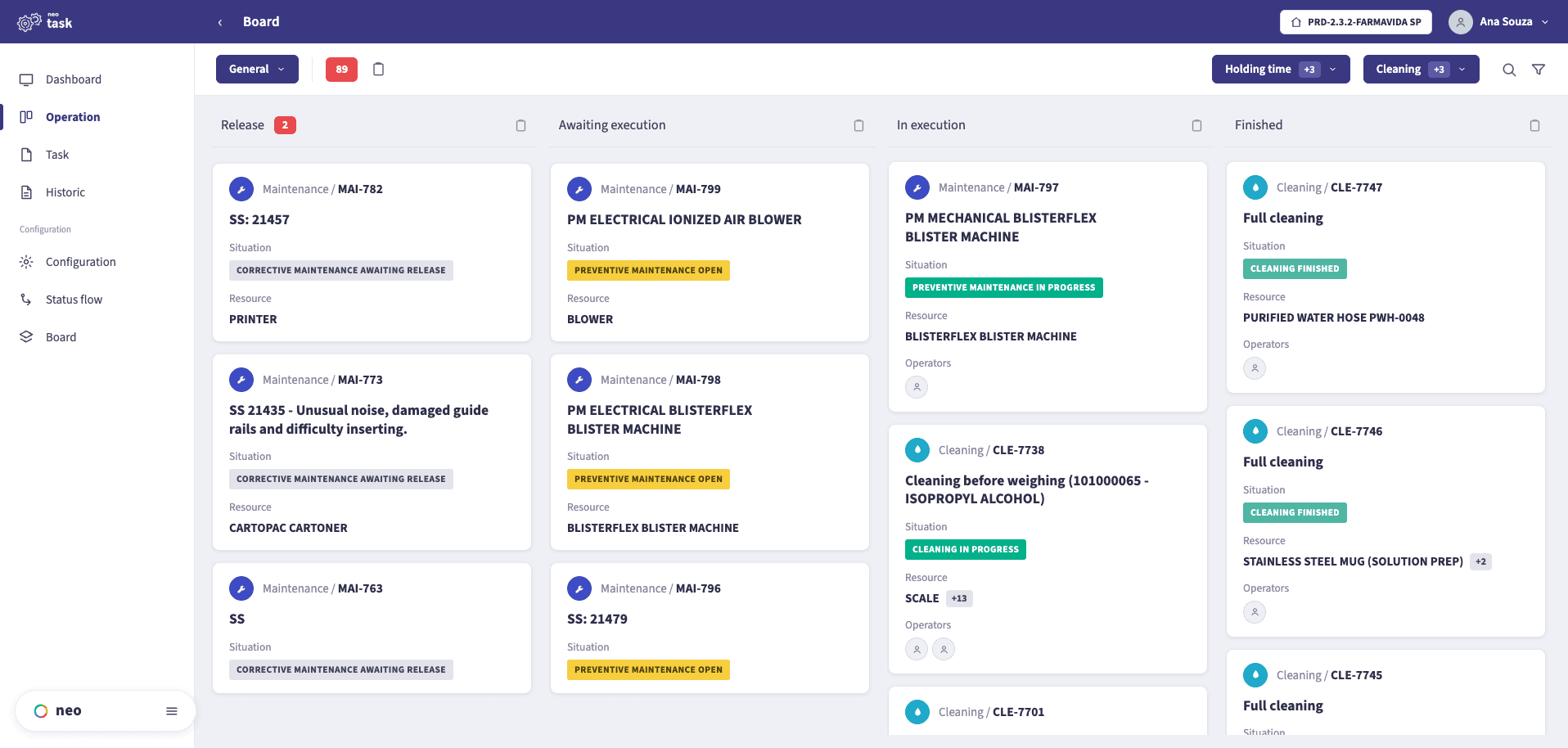
Every task sits in the column of the state it is in — release, awaiting execution, in execution, finished — with its resource, its situation and its operators, so the whole between-batch workload is visible at a glance.
A board per area or team
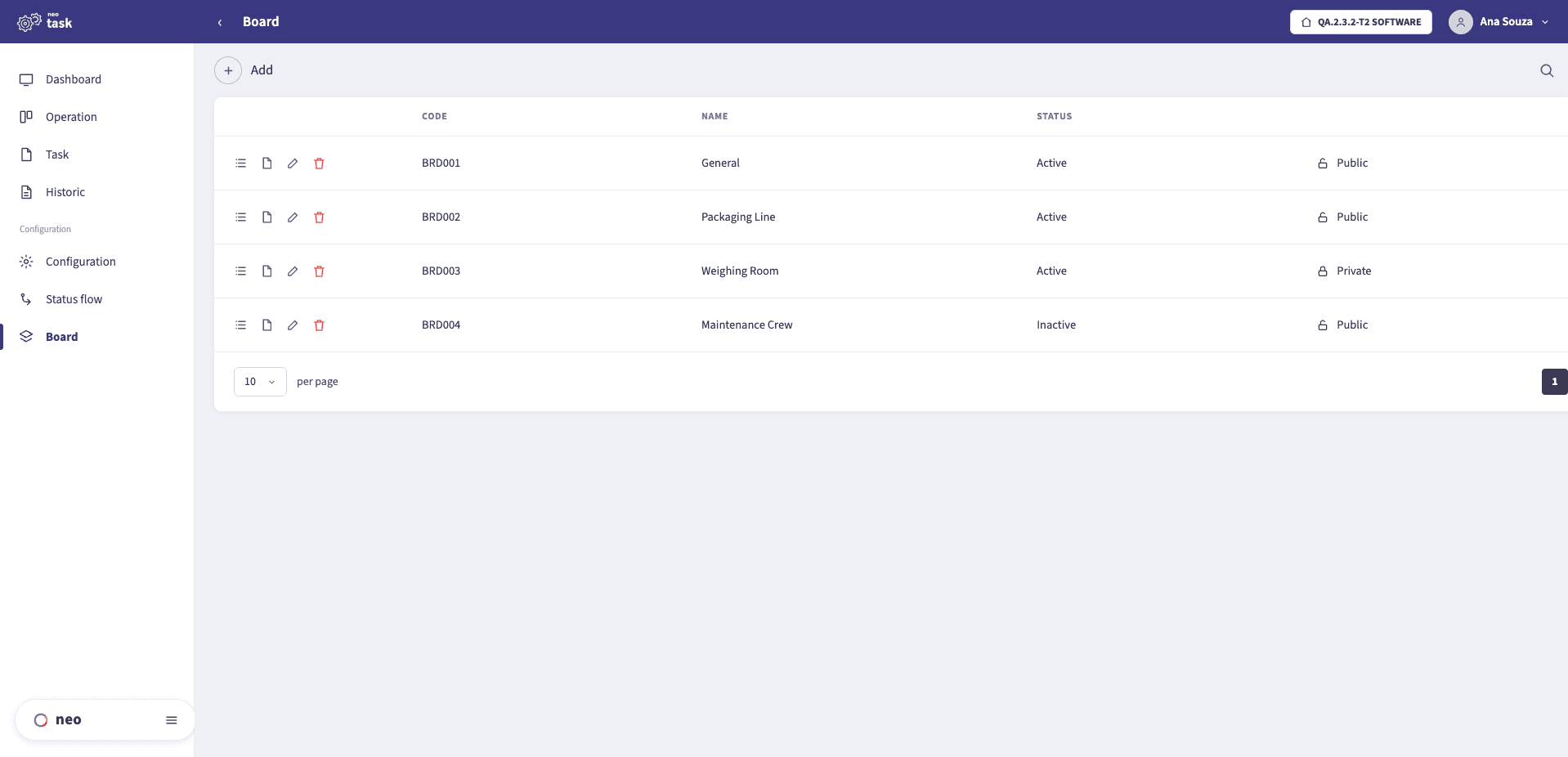
Boards are configured per area or crew — a weighing room, a packaging line, the maintenance team — and can be public or private, so each group works from the view that is theirs.
How a resource moves between states
- Resource in useallocated to an order, its time counted against the stage
- Becomes dirtythe dirty clock starts; production on it is not available
- Cleaning, setup, maintenance, calibrationwith an owner, a procedure and a recorded duration
- Related resourcesaffected items handled together, not one by one
- Clean, within validityproduction can be started; the clock to the next cleaning begins
Typical applications
What each team gains
- A control, not a reminderBlocking a non-compliant resource makes the rule structural, which is a far stronger position than a procedure everyone agrees with.
- History per resourceEvery cleaning, calibration and maintenance searchable by equipment, batch or period.
- No batch starting on the wrong equipmentAvailability is checked by the system at the moment of allocation, not remembered from the last shift.
- Plans that account for productionInterventions scheduled knowing which orders and which other resources they will hold up.
- Changeover time you can actually seeCleaning and setup measured rather than absorbed, which is usually where a plant finds its cheapest capacity.
Where NEO TASK sits
NEO FLOW allocates resources to a production order and tracks how long each stage takes. TASK decides whether those resources are in a state that allows it — and blocks them when they are not, so the two together mean a batch cannot start on equipment whose cleaning has lapsed or whose calibration is overdue.
The NEO EBR then records the batch that ran on them, and can point at the state of every resource at the moment it was used. Where a task depends on a measured condition, NEO PI supplies it from the instrument rather than from a manual reading.
Frequently asked questions
What kinds of task does NEO TASK manage?+
Cleaning (complete and partial), setup or changeover, preventive and corrective maintenance, and calibration. Each carries an owner, a procedure, a recorded duration and the resources it affects.
What does it mean for a resource to be blocked?+
That it has an open compliance problem — cleaning validity expired, calibration overdue, a maintenance not closed — and production cannot be started on it until the problem is resolved. The rule stops depending on anyone remembering it.
Why track dirty time and not just cleaning validity?+
Because equipment left dirty beyond a defined window may require a different, more thorough cleaning procedure. Without that clock the escalation is missed, and the wrong procedure gets applied to equipment that needed the heavier one.
How does it relate to NEO FLOW and NEO EBR?+
FLOW allocates resources to a production order; TASK decides whether those resources are in a state that allows it. EBR records the batch that ran on them. The three share the same resource model, which is why a block in one is visible in the others.
If the answer involves a logbook on a clipboard or asking whoever cleaned it last, that is the gap. Talk to our team about mapping your cleaning, setup, maintenance and calibration rules.