NEO APS: finite-capacity production scheduling the floor can run
A schedule made in a spreadsheet treats capacity as infinite and never charges for cleaning or setup — so it slips the moment it meets the floor. NEO APS sequences orders against real shift hours, counts the work between batches, warns when a plan breaks, and synchronizes the result to production and cleaning both ways.


Spreadsheets can not keep up with a changing shop floor. NEO APS builds a finite-capacity plan that accounts for equipment, materials, changeovers and shifts.
When reality changes, reschedule in minutes and see the impact on due dates immediately.
A plan the floor can actually run
A production schedule is a promise about time: this equipment will make these batches, in this order, within these hours. The trouble is that the promise is usually made in a spreadsheet that treats capacity as infinite — every order fits, because a cell always has room for one more line.
The floor knows better. A machine runs one batch at a time, a shift has a fixed number of hours, and between two batches there is cleaning and setup that the spreadsheet never charged for. So the plan looks feasible on Monday and has already slipped by Tuesday afternoon.
NEO APS sequences orders against real capacity — equipment by equipment, day by day, workshift by workshift — and then pushes the result to production and cleaning, so the plan and the floor are the same plan.
The whole plant on one grid
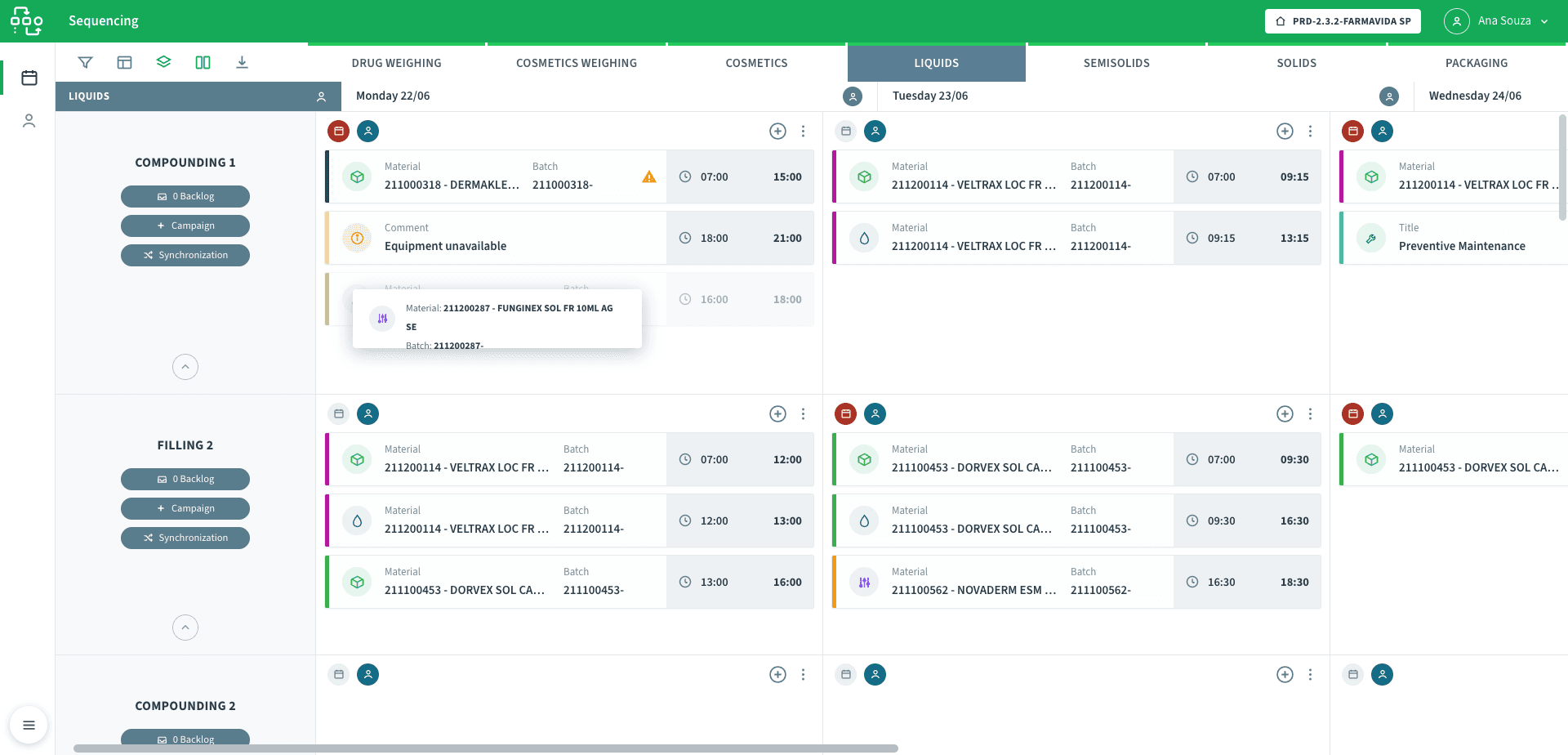
Equipment down the side, days across the top, sectors in tabs — each cell holds the batches sequenced for that equipment on that day, in order, with their times. Backlog, campaign and synchronization are one click from every line.
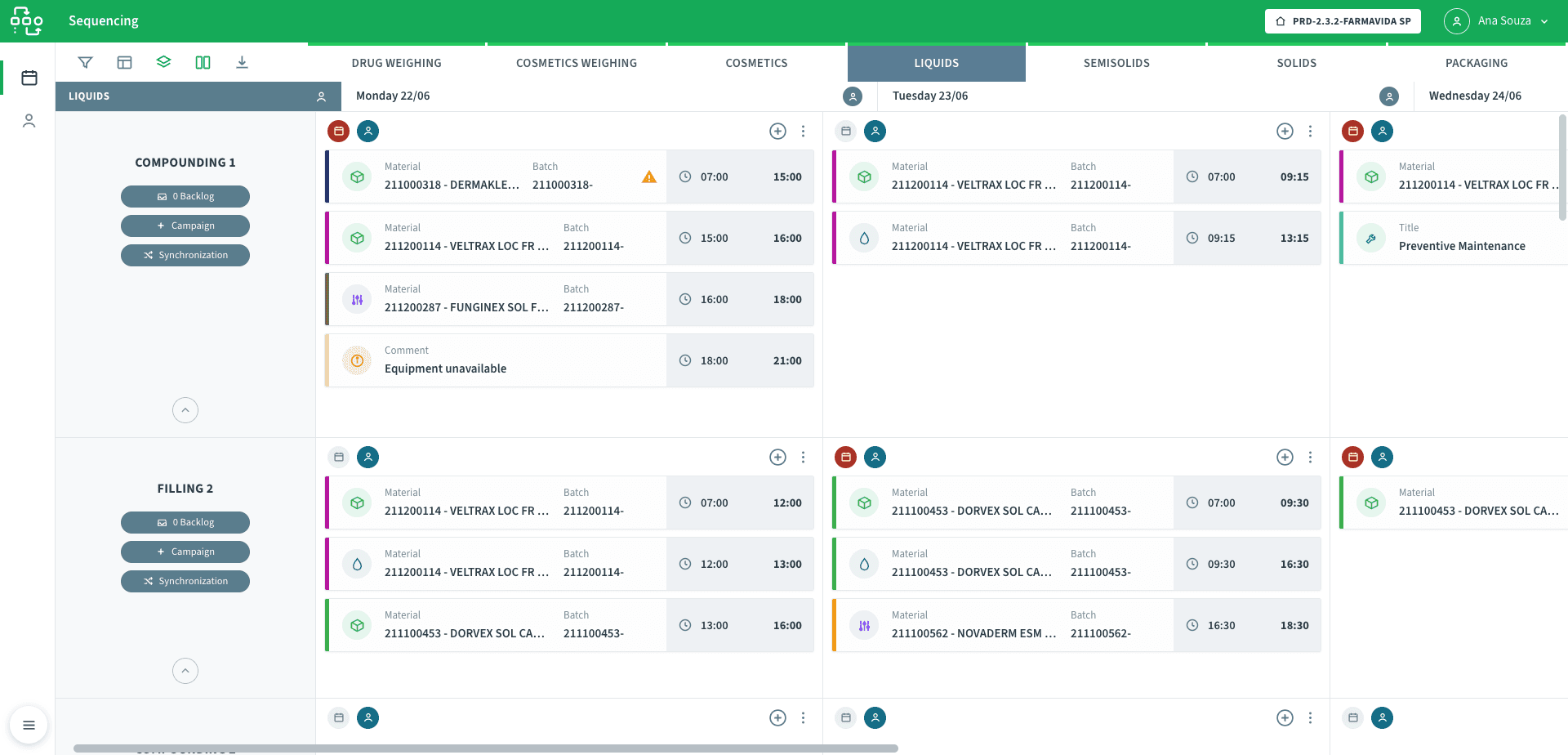
What NEO APS solves
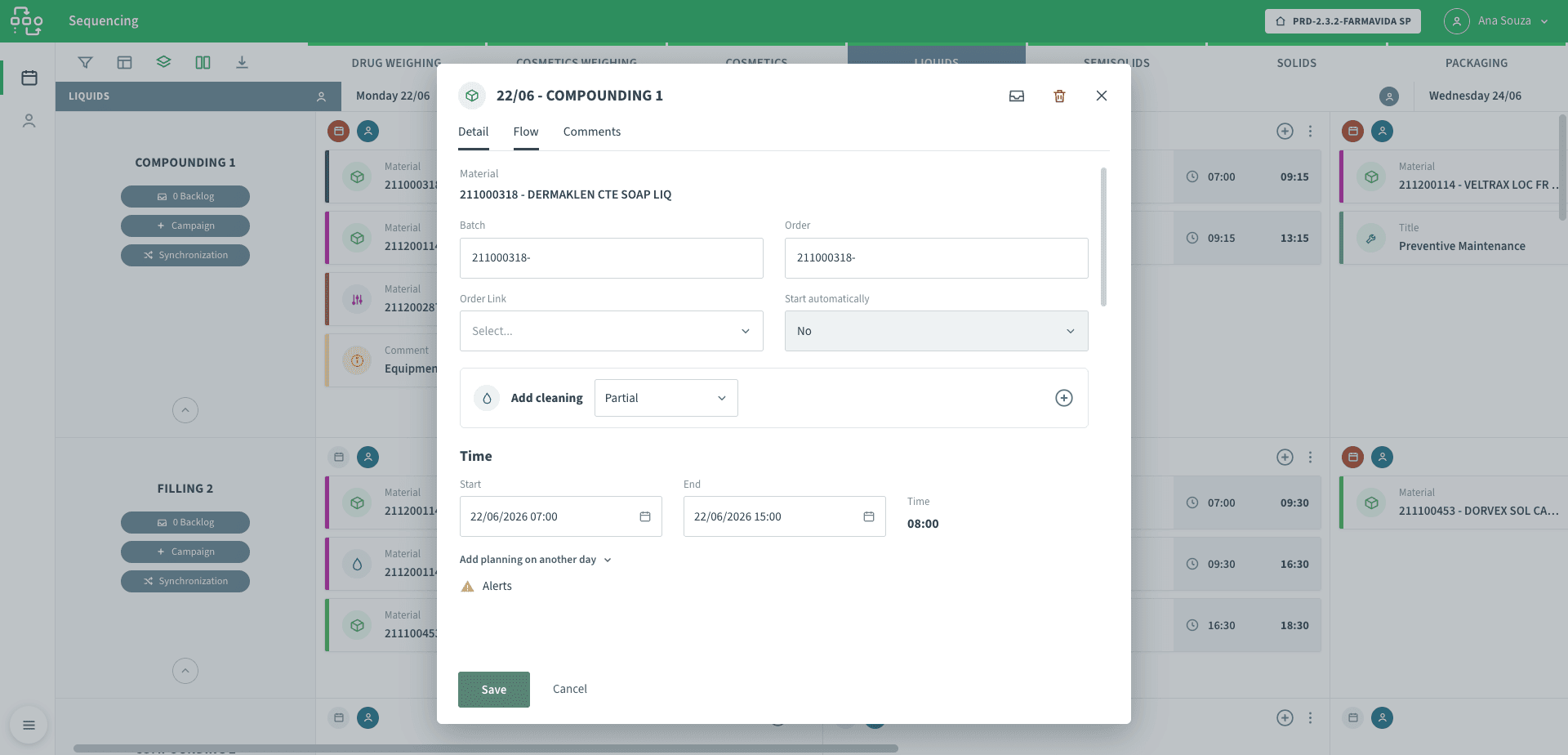
Inside an order: material, timing and the cleaning it needs
Each order carries its material, batch and order links, an option to add a full or partial cleaning, and start and end times from which the duration is computed — the building block the grid sequences.
See it running
A walkthrough of sequencing orders on the grid, watching the capacity alerts, and synchronizing the plan to the shop floor.
Finite capacity, including the work nobody plans
Every cell in the grid is an equipment on a day, and it has a ceiling: the hours of its workshift. As orders are placed, NEO APS adds up their durations and shows what is scheduled, what is left, and what has spilled into overtime — so a day that is full looks full instead of pretending to hold one more batch.
Two things most planning tools ignore are built in here:
- The work between batches — cleaning and setup orders are generated and linked to the production they follow, with their own duration, so a changeover consumes capacity instead of disappearing between two lines.
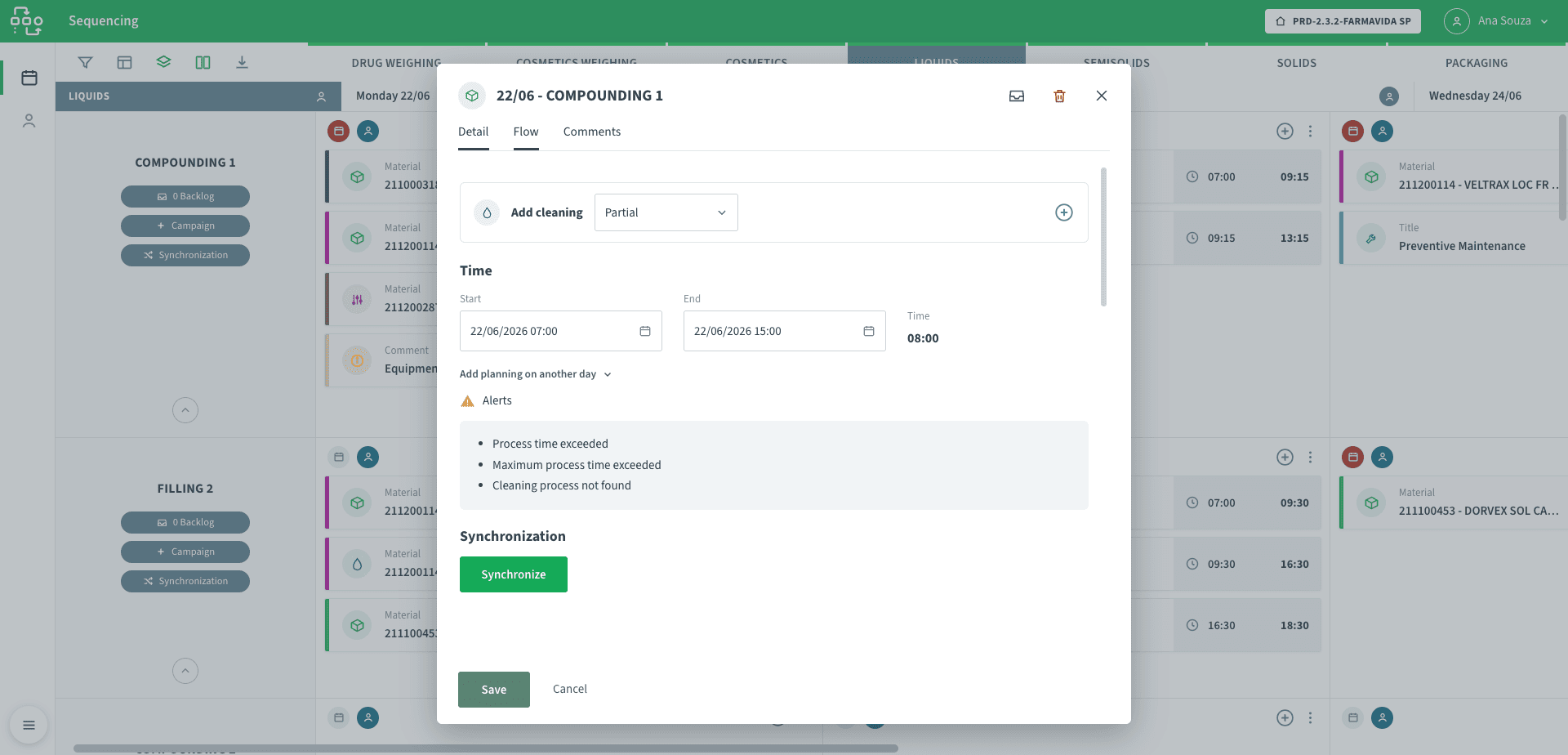
- Alerts where the plan breaks — process time exceeded, maximum process time exceeded, a cleaning procedure not found: the cell tells the planner the sequence is infeasible while it can still be moved, not on the shift it was meant to run.
The routing behind each order comes from its production flow, so the time an order takes is its real process time — running, holding, preparation, release — not a round number typed into a plan.
The plan tells you when it will not work
Process time exceeded, maximum process time exceeded, cleaning process not found — the alerts fire while the order can still be moved, so an infeasible sequence is caught at the desk, not on the shift.
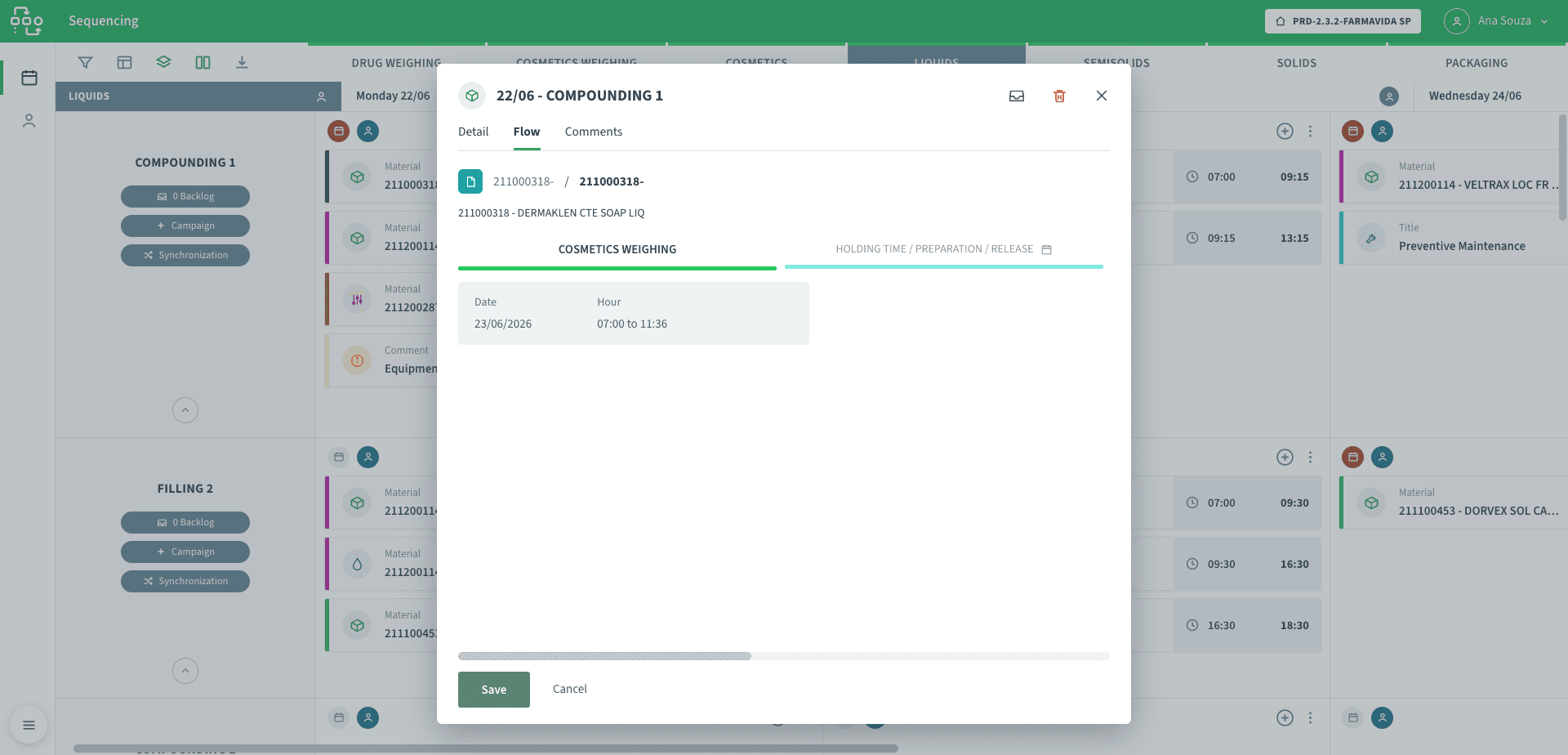
Time that comes from the real routing
The order’s flow tab shows the process steps behind it — weighing, holding time, preparation, release — each with its window, so the duration on the grid is the real process time and not a guess.
Sequencing is drag-and-drop
The planner moves a card to reorder it within a cell or to another day, and the times of the affected orders recalculate around it — control stays with the person while the arithmetic follows the move.
Try the change before you commit to it
A rush order arrives, a machine goes down, a campaign is brought forward — the question is always the same: what does it do to everything else? Answering it on the live plan means breaking the live plan to find out.
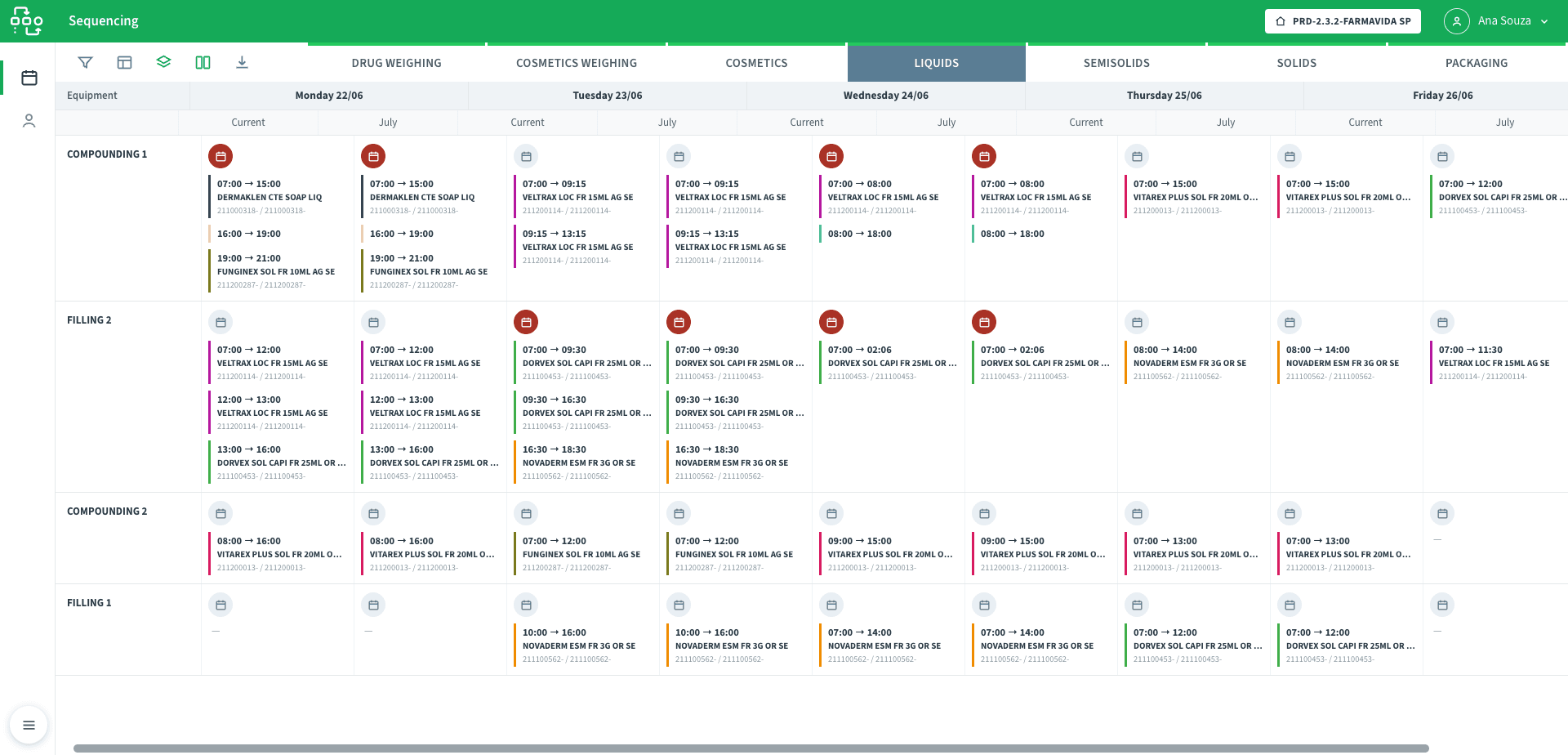
NEO APS lets a planner snapshot the current plan, rearrange freely in a scenario, and compare it side by side with what is running now — Current against a proposed version — before deciding. Nothing on the floor changes until the version is applied.
Versions can be branched, renamed and restored, so a plan has a history rather than a single mutable state: the planner can go back to what Tuesday looked like, keep two candidate schedules alive at once, and apply the one that wins. What-if stops being a mental exercise and becomes something you can look at.
Compare a proposed plan against the live one
Each equipment and day can be shown as the current plan beside a proposed version, so a change is evaluated side by side before it is applied — and nothing on the floor moves until it is.
If the plan is a spreadsheet that ignores cleaning time, changeovers and real shift hours, it is optimistic by construction. Talk to our team about sequencing against finite capacity and keeping the floor in sync.
What it covers
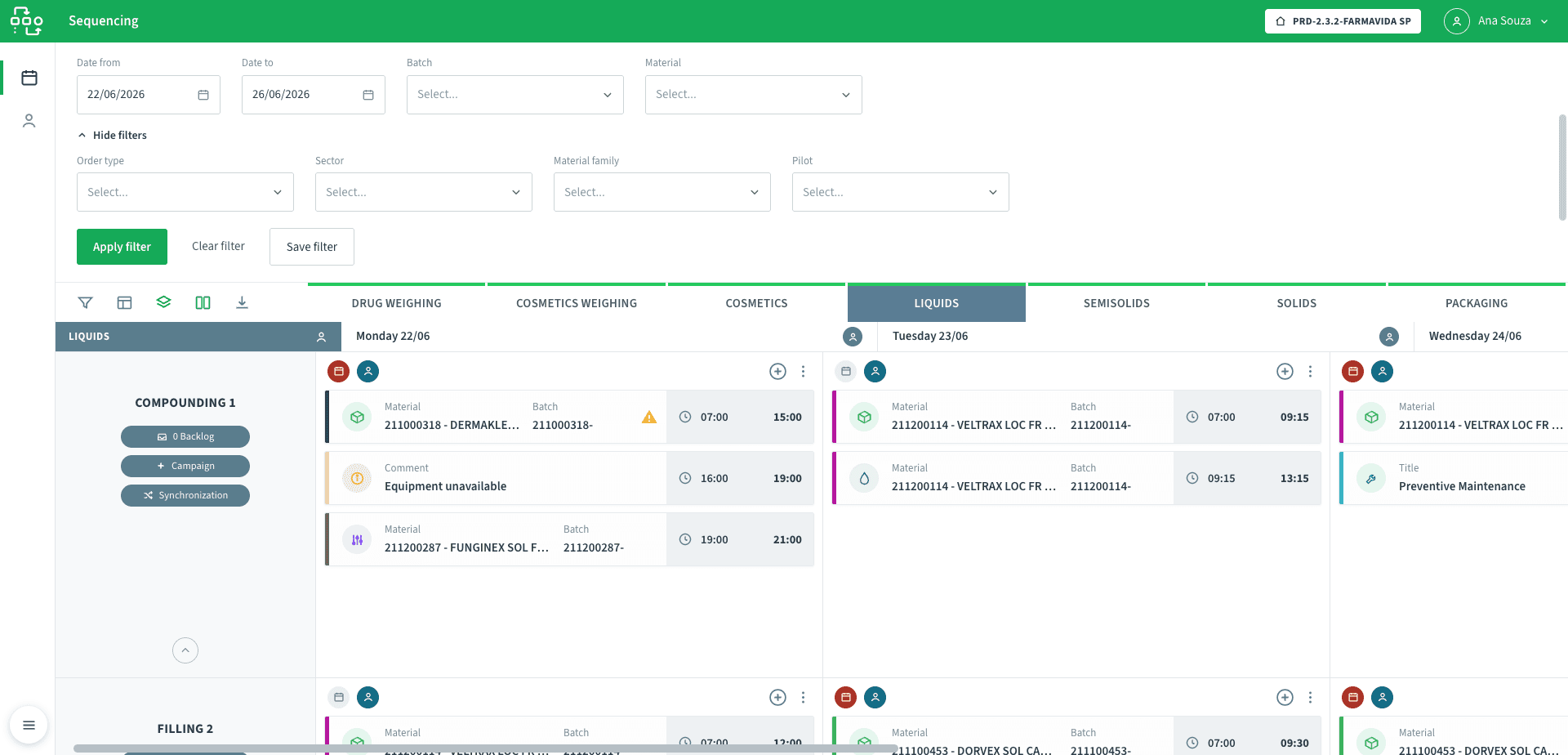
Find the work, save the view
Filter the grid by date range, batch, material, order type, sector, material family or pilot, and save the filter — so a planner returns to the same working view instead of rebuilding it each morning.
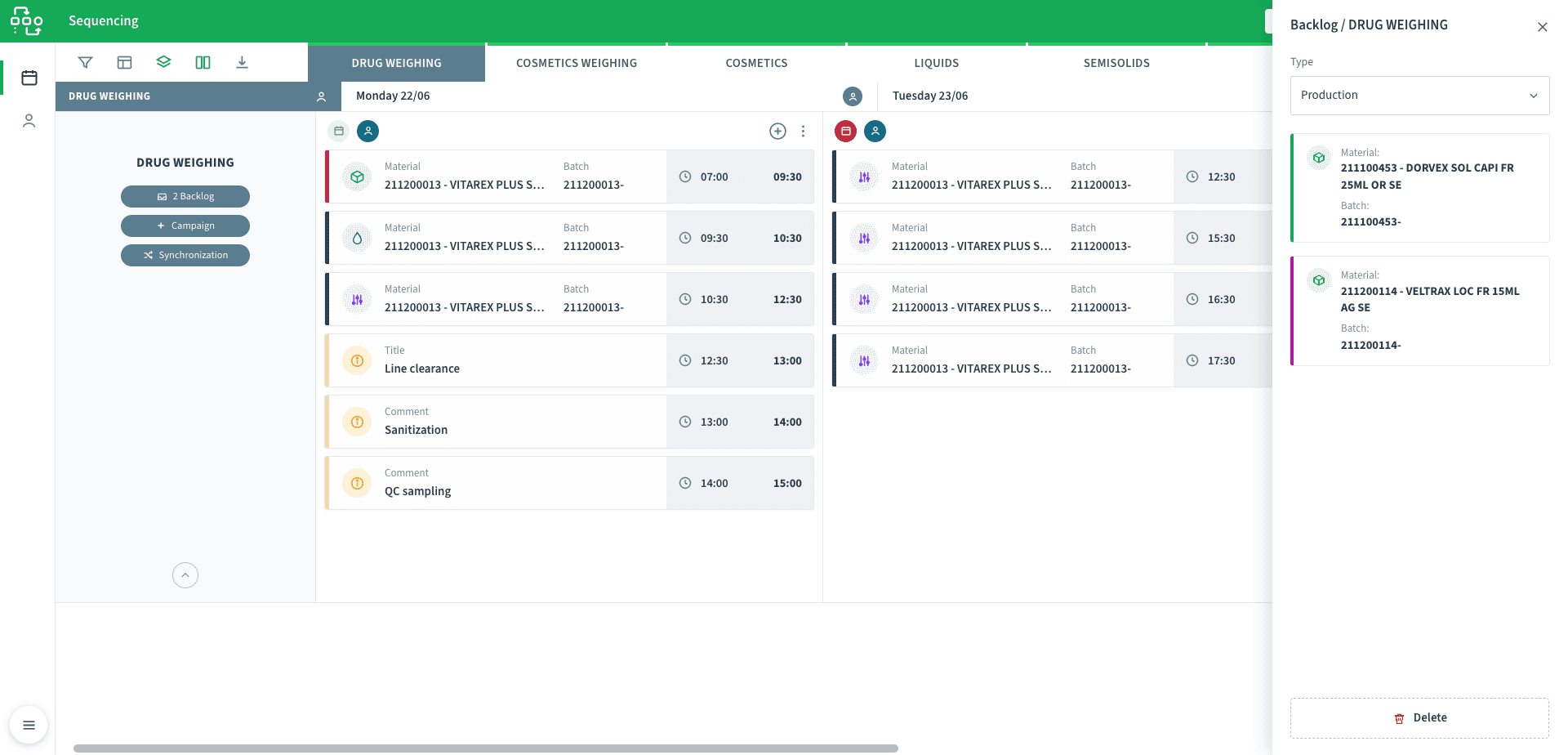
A backlog for what is not scheduled yet
Orders waiting to be placed sit in a backlog per sector, ready to be applied into a cell when there is room — and returned to it when a sequence changes — so nothing waiting is ever lost off the grid.
Staff the plan, not just the machines
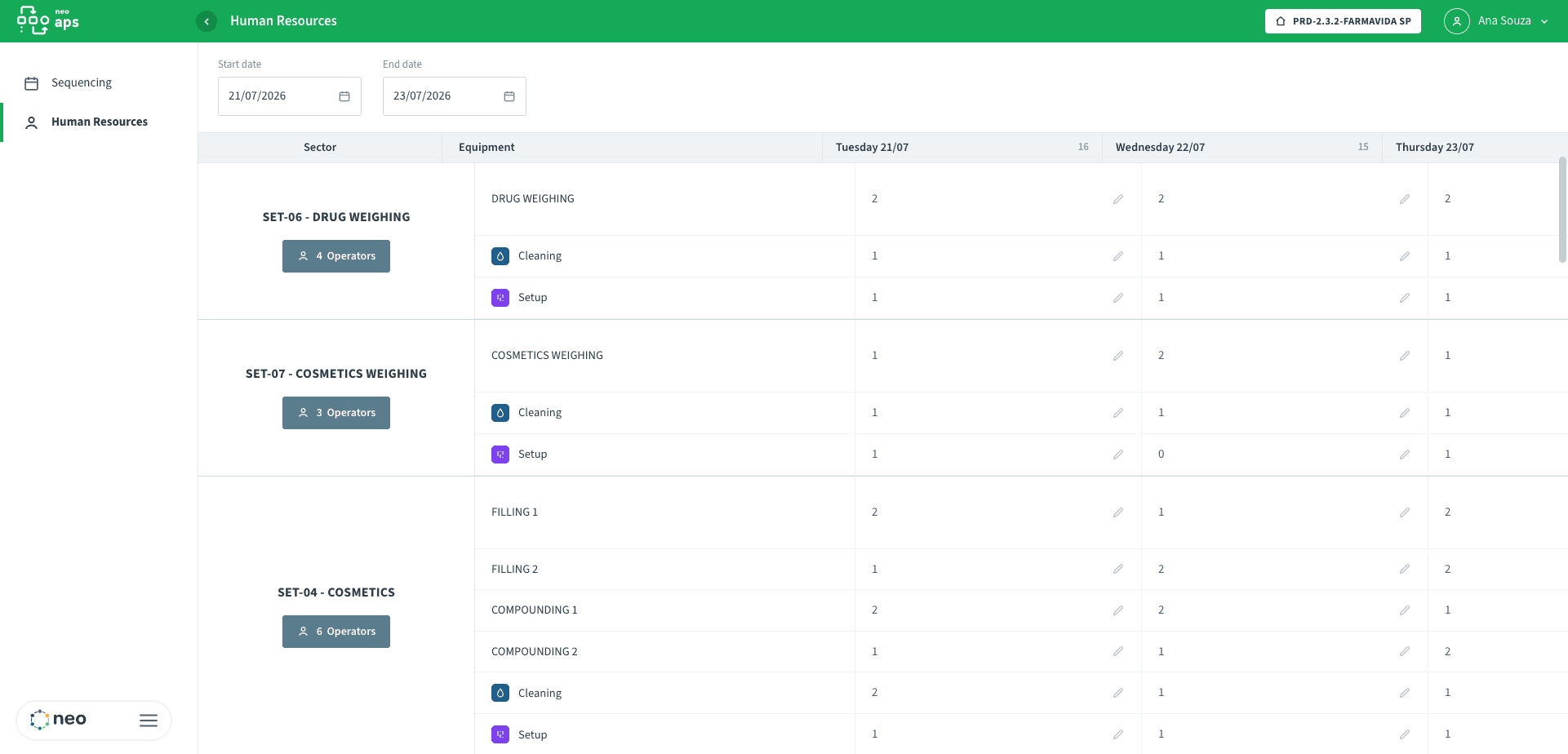
Operators are allocated per sector, equipment and activity — production, cleaning, setup — across the days, with absences accounted for, so the schedule reflects the people available to run it and not only the equipment.
How an order reaches the floor
- Unscheduled orderwaiting per sector, with its material and batch
- Placed on the gridan equipment, a day, a position — time calculated from its routing
- Cleaning and setup attachedlinked orders consuming their own capacity
- Within the shift, no alertscapacity respected, process time feasible
- Pushed to the floora production order in FLOW, a cleaning order in TASK, kept in sync
Typical applications
What each team gains
- Control, not a black boxThe planner sequences by hand and the system does the arithmetic — capacity, linked orders, alerts — so judgment stays with the person and the tedium does not.
- What-if you can showScenarios and version comparison turn "it should be fine" into a plan two people can look at and agree on.
- A schedule that matches the dayBecause cleaning, setup and shift hours are in the plan, the floor gets a sequence it can actually run instead of one it has to quietly rewrite.
- Due dates you can trustA finite-capacity plan gives commitment dates that reflect what the plant can actually make, not an optimistic sum of durations.
- Capacity you can see and defendThe grid makes the constraint visible, which is where the cheapest extra output usually hides — in a changeover, a shift or a bottleneck nobody had measured.
Where NEO APS sits
NEO APS is the layer that decides when. It sequences the orders and, once a plan is committed, synchronizes each one to NEO FLOW as a production order and to NEO TASK as the cleaning and setup that go with it — bidirectionally, so a change on either side does not silently diverge.
From there NEO W&D dispenses the materials each scheduled batch needs, the NEO EBR records the batch that ran, and NEO OEE measures what capacity actually delivered against what was planned — the feedback that makes the next plan more honest.
Frequently asked questions
Does NEO APS schedule automatically?+
No — sequencing is manual, by drag-and-drop. The planner decides the order; the system does the arithmetic behind it: time from routing, capacity per workshift, linked cleaning and setup, and alerts when a sequence becomes infeasible. It keeps human judgment in charge and takes the calculation off the planner.
How does it know how long an order takes?+
From the material’s routing in NEO FLOW — the process steps and their times, running and setup, with equipment-specific overrides. So a duration on the grid is the real process time of that order, not a round number typed by hand.
What is the difference between a scenario and a version?+
Both snapshot the plan, but a version is a named, persistent plan you can branch, rename, compare side by side and restore — a plan with a history. A scenario is a what-if you build, evaluate and apply or discard. Neither touches the floor until you apply it.
How does it stay in sync with production?+
When a plan is committed, each order is synchronized to NEO FLOW as a production order and to NEO TASK as its cleaning and setup, and the link is bidirectional. A synchronization status and timestamp are kept per order, so an order that failed to sync is visible rather than silently missing from the floor.
If the plan is a spreadsheet that ignores cleaning time, changeovers and real shift hours, it is optimistic by construction. Talk to our team about sequencing against finite capacity and keeping the floor in sync.